
If you run a real-money gaming app, location isn’t a nice-to-have. It’s the lock on the front door.
iGaming geofencing is how you make sure only players inside approved jurisdictions can register, log in, deposit, and place bets, especially on mobile where people move across city lines in minutes. Get it wrong and you’re not just losing revenue, you’re risking a license issue, a regulator inquiry, or a forced shutdown in a key market.
This guide breaks down how to set up geofencing on iOS and Android in a way that holds up under audits, user complaints, and the messy reality of GPS drift.
What “geofencing” really means in regulated iGaming
A geofence is a rule that decides whether a user is inside or outside an allowed area. In iGaming, that rule has to be defensible, not just “the map dot looks close enough.”
Think of it like a bouncer checking IDs at the door. A weak check lets the wrong people in. An overly strict check blocks good customers and floods support tickets.
Most regulators care about two outcomes:
- Only eligible players can wager in approved regions.
- You can prove you enforced it, with records that match your policies.
If you’re designing your broader compliance program, pair this guide with an iGaming compliance documentation guide so your technical controls and your written policies tell the same story.
Compliance requirements to nail before writing code
Before you pick an SDK or draw a polygon on a map, clarify what “compliant” means for each jurisdiction you serve.
Define your enforcement moments (the “when”)
Most operators enforce geolocation at several points:
- Account creation and login
- Deposit, withdrawal, and payment method changes
- Bet placement (the big one)
- Session re-checks (timed or triggered by movement)
Define your decision policy (the “what”)
Your geolocation decision should output something simple and logged:
- Allowed to view content
- Allowed to play free-to-play only
- Allowed to wager
- Blocked (with a user-friendly reason and next step)
Define your evidence (the “prove it”)
You’ll want an audit trail that includes:
- Timestamp, app version, device type
- Location sources used (GPS, Wi-Fi, cell)
- Confidence/quality signals (not raw GPS only)
- Final decision and jurisdiction rule applied
For a practical reference on how cloud architectures support this, AWS has a clear overview in Building geolocation verification for iGaming and sports betting on AWS.
The mobile reality: GPS alone isn’t enough
On mobile, location is noisy. People play indoors. Towers bounce. Wi-Fi changes. Some users try to spoof. Your setup needs layered signals and a plan for “uncertain” results.

A simple way to think about it:
| Signal | Strengths | Common problems |
|---|---|---|
| GPS | Precise outdoors, widely available | Weak indoors, easy to spoof on some devices |
| Wi-Fi | Strong indoors, adds confidence | VPN and router movement can confuse results |
| Cell triangulation | Works without Wi-Fi | Less precise, varies by carrier and density |
The best setups treat location verification like a scorecard, not a single yes/no input.
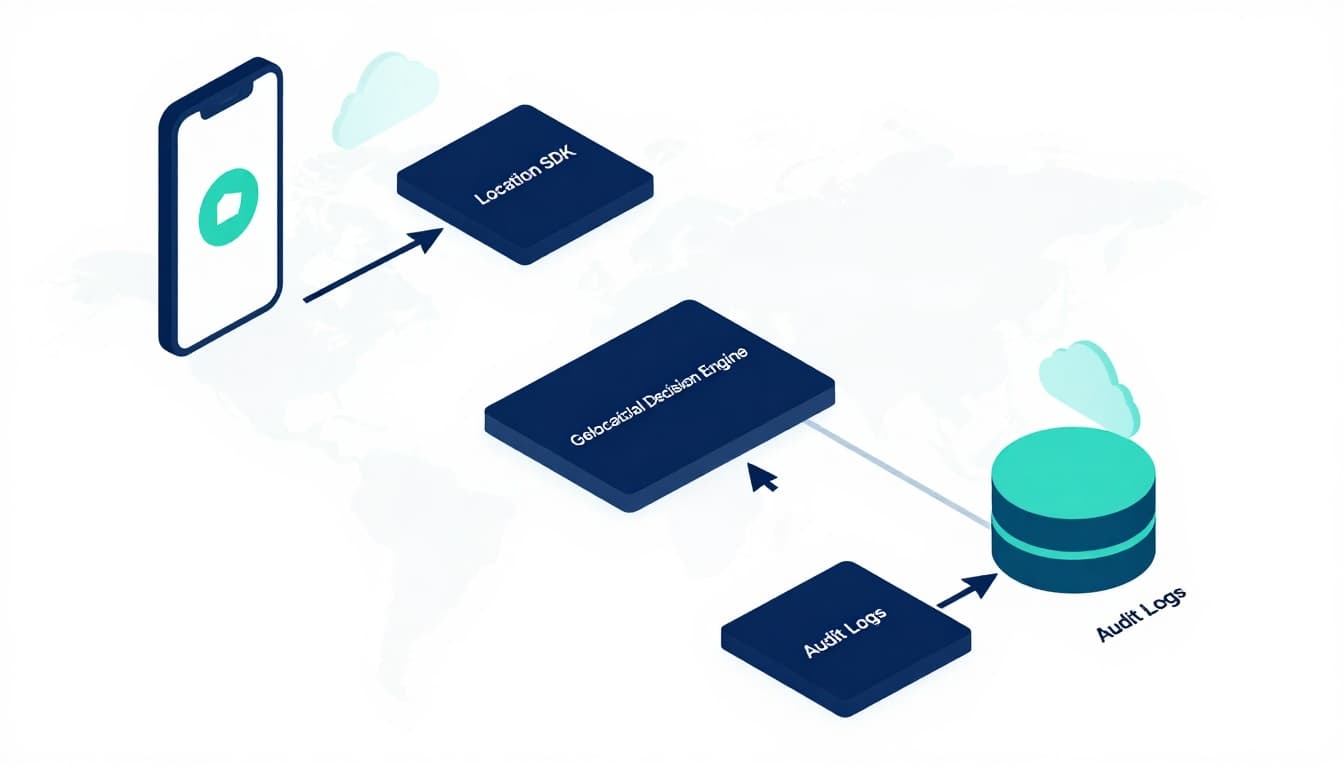
Recommended architecture for iGaming geofencing (clean separation wins audits)
A common mistake is hard-coding jurisdiction rules inside the mobile app. That makes updates slow and audit explanations painful.
A cleaner pattern:
- Mobile app collects signals and requests verification
- A location SDK or module normalizes device inputs
- A decision engine applies current jurisdiction rules
- A policy service stores boundaries and logic
- Audit logs store the decision package
If you want a more detailed blueprint, AWS also publishes Guidance for Building Geolocation Systems for the Betting & Gaming Industry on AWS.
Step-by-step: iGaming geofencing setup on mobile apps
1) Map your licensed footprint (then add buffers on purpose)
Start with official boundaries for each allowed jurisdiction (state, province, country, tribal land, etc.). Then decide how you’ll handle edges.
Edges are where problems live: bridges, rivers, highways, and apartment buildings that sit near borders.
Common approaches:
- Hard border: strict polygon, fewer regulatory worries, more false blocks.
- Soft border: add a small buffer zone where you require extra checks or re-verify more often.
Write this down in policy. Your support team will need the explanation when a player asks, “Why can’t I bet from my couch?”
2) Choose build vs provider (and be honest about your timeline)
Many operators use a specialized geolocation provider because audits and spoofing countermeasures add complexity fast. For examples of geolocation compliance features aimed at regulated gaming, review provider descriptions like GeoLocs geolocation compliance features.
If you build in-house, plan for:
- Boundary management (versioning, approvals, rollback)
- Fraud detection signals (mock locations, impossible travel, device integrity)
- On-call support for location outages (yes, they happen)
3) Design the user flow for permission, failure, and retry
A compliant flow isn’t just “Allow location?” It’s a short script you can defend:
- Explain why location is required (plain English, no legal fog)
- Ask for permission at the moment it matters (not at app launch)
- Provide a fallback path (help article, support link, retry button)
- Never encourage workarounds like VPN tips
If you’re refining your mobile onboarding and messaging, it helps to understand the broader mobile technology impact on digital marketing because permission prompts are marketing moments too.
4) Put geofence checks in the right places
At minimum, enforce at wager time. Many teams also enforce at login and deposit, but tune it so you don’t punish normal movement.
A practical cadence:
- Verify on login
- Verify on deposit initiation
- Verify right before bet placement
- Re-check every X minutes during an active session, and on app resume
iOS and Android implementation details that affect compliance
Handle permissions like a product feature
On iOS and Android, you’ll face users who select “While Using the App,” deny location, or turn off precise location. Your app should still behave predictably.
Two simple rules:
- If you can’t verify location with enough confidence, don’t allow wagering.
- Log the reason code (permission denied, low accuracy, mock location detected).
Account for VPNs and spoofing attempts
Geofencing is not the same as IP blocking. IP data can support risk scoring, but it’s not a reliable source of truth on its own.
Add controls that detect:
- Mock location settings (especially on Android)
- Emulator patterns
- Location jumping (impossible speed between checks)
Testing, monitoring, and audit logs (where most teams fall short)
Before launch, test the edges, not just the center of a state.
A simple test plan:
- Border crossings (drive tests, or controlled test devices)
- Indoor locations (Wi-Fi heavy environments)
- Low signal areas (parking garages, rural zones)
- Known spoof attempts on test devices
In production, monitor:
- Block rate by jurisdiction and app version
- “Unable to verify” rate (often a permissions UX problem)
- Support tickets tagged as location issues
- Decision latency (slow checks cause abandoned bets)
For deeper best practices and common pitfalls, Locance publishes a helpful overview in its gaming geolocation best practices whitepaper.
Common geofencing mistakes that trigger regulator questions
- Rules only in the app (hard to audit, easy to bypass)
- No versioning of boundaries (you can’t explain what rule applied last month)
- Missing decision logs (you’ll struggle to answer “why was this bet allowed?”)
- Treating “low confidence” as “close enough” (border abuse becomes easy)
Conclusion: treat iGaming geofencing like a control, not a feature
When your app crosses state lines, your risk crosses with it. iGaming geofencing works best when it’s built as a system: clear policies, layered signals, server-side rules, and logs you can defend.
If you’re planning expansion into new jurisdictions, set up your boundaries and audit trail now, before marketing spend and acquisition ramp up. The cleanest launches are the ones where compliance is quiet because it’s already working.

Adeyemi Adetilewa leads the editorial direction at IdeasPlusBusiness.com. He has driven over 10M+ content views through strategic content marketing, with work trusted and published by platforms including HackerNoon, HuffPost, Addicted2Success, and others.