
Ever built an AI feature that looked amazing in a demo, then quietly failed once real users touched it?
That’s the hidden trap with AI products: you’re not just shipping software. You’re shipping software plus data, plus a model, plus a feedback loop that never stops. For founders, marketers, and small business owners, the AI product lifecycle is the difference between a useful product and an expensive experiment.
This guide breaks the lifecycle into practical stages, from first idea to deployment, then scaling without losing quality, trust, or control.
A simple way to think about the AI product lifecycle
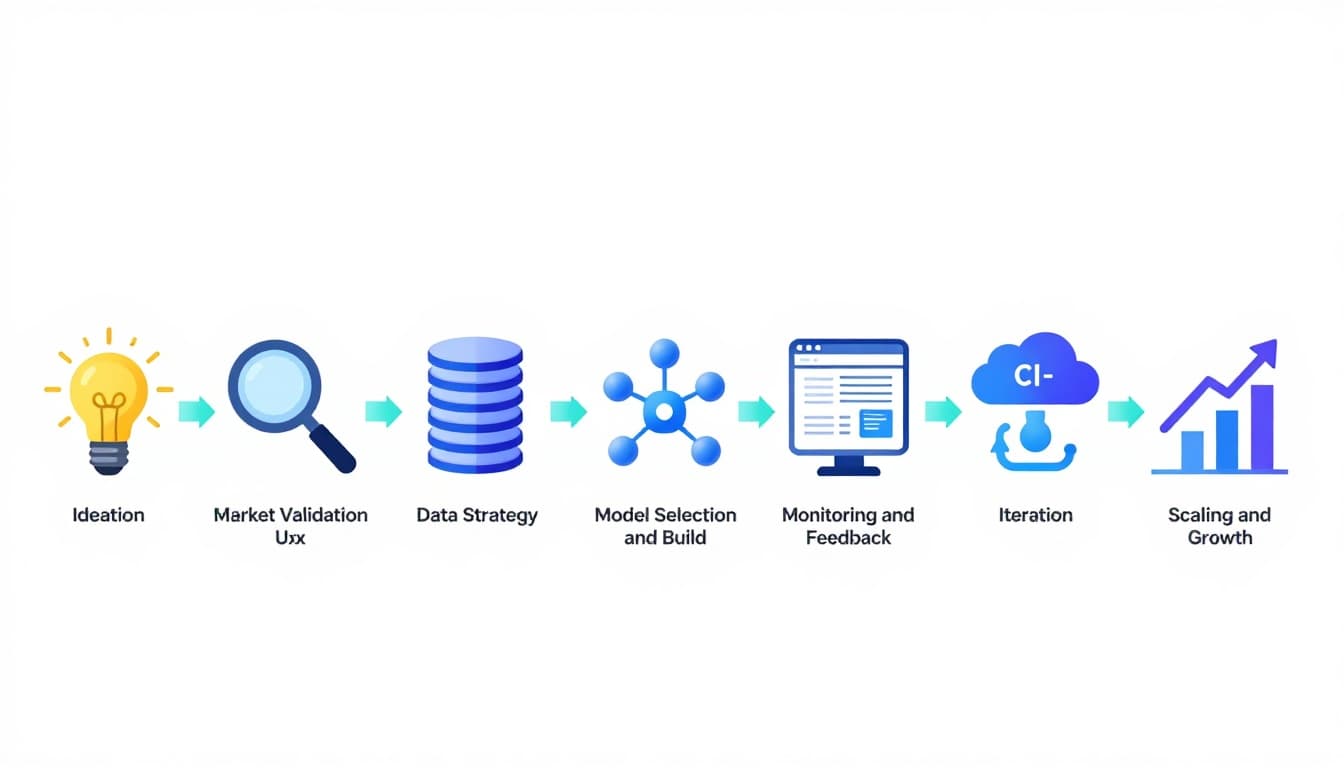
A classic software lifecycle assumes code behavior stays stable unless you change it. AI is different. Your model’s output can shift because user behavior shifts, data drifts, or prompts and context evolve.
So the goal isn’t “launch and relax.” It’s “launch and learn,” with guardrails.
For more formal stage definitions, compare frameworks like this overview of the AI product lifecycle stages.
The AI digital product creation lifecycle (10 stages that actually hold up)
1) Ideation: start with a painful, frequent job-to-be-done
A strong AI product idea usually removes friction from something people already do often, like answering support tickets, writing listings, spotting fraud, or routing leads.
Keep your first draft simple: “For (who), AI helps (do what) by (how), so they get (result).”
Example: A Shopify seller uses an AI listing assistant to turn messy notes into clean product pages.
2) Market validation: prove demand before you touch a model
Validation is cheaper than training. Run a landing page, a waitlist, or 10 customer interviews and look for patterns: what people pay for, what they refuse, and what they already hack together.
Who it’s for: founders and marketers.
Tools: Webflow, Carrd, Typeform, Stripe payment links for pre-orders.
Example: A consultant validates an “AI proposal writer” by selling 20 early-access seats.
3) Data strategy: decide what data you need, and what you can’t use
This is where many AI products quietly break. You need to know:
- What data you’ll collect (and why)
- What data you’ll never store (because it’s risky or unnecessary)
- How you’ll label, clean, and version it
If your product includes analytics or forecasting, it helps to understand how AI supports decision systems, see AI-driven business intelligence strategies.
4) Model selection/build: buy, adapt, or train
You don’t always need to train a model. Many teams start with an API model, then fine-tune or add retrieval when they hit limits.
A practical decision rule:
If accuracy depends on your private knowledge base, focus on retrieval and data quality first. If accuracy depends on a unique pattern in your domain data, then consider fine-tuning.
Example: A legal intake tool retrieves from firm-specific templates and past filings, so outputs match how the firm works.
5) UX and product design: make AI feel predictable
Users don’t want “AI magic.” They want control. Great AI UX often includes:
Clear inputs (what the user provides), clear outputs (what the system returns), and clear next actions (edit, approve, retry, escalate).
Example: In a resume-screening tool, recruiters can see why a candidate was ranked, then override the result.
6) MVP/prototype: ship a narrow use case fast
Your MVP should solve one job end-to-end, even if it’s not fully automated. Early on, “human-in-the-loop” is fine if it improves output quality and teaches you where the AI fails.
Who it’s for: early-stage startups, agencies, and internal teams.
Example: A real estate team launches an AI email responder that drafts replies, but agents approve before sending.
7) Deployment and MLOps: treat models like living dependencies
Deployment is not just pushing code. You need versioning (model, prompts, data), rollback plans, and secure access. Security matters because AI systems expand your attack surface, including data exposure and prompt injection risks. This security-focused view of the AI development lifecycle is a useful reference.
Example: A fintech app rolls out a fraud model behind a feature flag, then expands once false positives stay low.
8) Monitoring and feedback: measure more than uptime
In AI products, “working” can still mean “wrong.” Monitor quality signals like user corrections, downvotes, escalation rates, and drift in inputs.
A helpful mindset: instrumentation is your product’s smoke alarm. If you can’t observe quality, you can’t protect customers.
Example: A customer support copilot tracks “agent edits per response” to spot when suggestions stop helping.
9) Iteration: improve the system, not just the model
Iteration might mean better prompts, better retrieval, better guardrails, or a better UI that captures context. In January 2026, many teams are also testing “agentic” workflows, where AI handles multi-step tasks (draft, check, summarize, route), but with strict review points.
Example: An accounting assistant drafts reconciliations, then flags only the weird cases for a human.
10) Scaling and growth: expand carefully, keep trust intact
Scaling isn’t only about traffic. It’s about consistent outcomes across new segments, new data sources, and new edge cases. Plan for:
Governance (who approves changes), compliance (what you log), and support (what happens when AI fails).
Example: A healthcare scheduling tool expands from one clinic to ten, adding role-based access and audit logs before expanding features.
Quick tool stack cheat sheet (by lifecycle stage)
If you’re building fast, pick a small stack you can actually maintain. If you want a broader menu of options, this ultimate list of AI tools by category is useful for benchmarking.
| Lifecycle area | Common tools/platforms | Best for |
|---|---|---|
| Validation | Typeform, Google Forms, Stripe | Proving demand and pricing |
| Design | Figma, Framer | Prototypes users can react to |
| Build | API LLMs, vector databases, app backend | Shipping the first workflow |
| Deployment | Docker, CI/CD, feature flags | Safe rollouts and rollback |
| Monitoring | Product analytics, logging, dashboards | Quality, drift, and trust |
How to choose the right AI product (or business idea) before building
Use this quick checklist to avoid building the wrong thing fast:
- Real pain: Would the buyer pay to remove this friction?
- Data reality: Can you legally and reliably access the needed inputs?
- Frequency: Does the problem happen weekly (or daily), not yearly?
- Fallback plan: What happens when the AI is unsure or wrong?
- Proof path: Can you validate in 14 days with a prototype or concierge MVP?
- Retention hook: What keeps users coming back, beyond curiosity?
Conclusion: treat the lifecycle as your unfair advantage
AI products win when the team respects iteration, measurement, and risk from day one. The AI product lifecycle gives you a repeatable way to test ideas, ship safely, and scale without breaking trust.
Pick one stage you’ve been skipping, then fix it this week. Your customers will notice, and your roadmap will stop feeling like guesswork.

Adeyemi Adetilewa leads the editorial direction at IdeasPlusBusiness.com. He has driven over 10M+ content views through strategic content marketing, with work trusted and published by platforms including HackerNoon, HuffPost, Addicted2Success, and others.