
When a player asks for an iGaming limit increase, it can feel like a routine support ticket. In 2026, it isn’t. It’s closer to raising a credit card limit: you need a clear process, documented reasoning, and enough evidence that a regulator (or auditor) can follow the trail months later.
This post is for operators, platform founders, compliance leads, and product teams who want a simple, defensible way to handle limit increase requests without turning the process into red tape. You’ll get a practical approval workflow, cooling-off rules that are easy to implement, and a note-taking approach that holds up under audit.
Why iGaming limit increase requests are tougher in 2026
Regulators are pushing for clearer, more consistent “customer-led” controls, and they expect those controls to be easy to find, easy to use, and properly recorded.
In Great Britain, the UK Gambling Commission has already introduced phased changes from late 2025, and more standardization is due in 2026. The Commission’s update on new deposit limit rules for consumers makes the direction obvious: limit tools should be visible, customers should be prompted to choose them, and reviews should be encouraged over time.
A key operational shift is the different treatment of decreases vs increases:
- Decreases should take effect right away (protect the customer).
- Increases should not be instant (reduce impulsive decisions).
From a business perspective, this is also about risk. A weak process can trigger player complaints, chargeback exposure, and compliance findings. If you already take card payments, you’ll recognize the “prove it” mindset from payment security. The same discipline that supports a Stripe PCI compliance overview is what keeps your responsible gambling controls defensible.
A simple approval workflow that doesn’t slow teams down
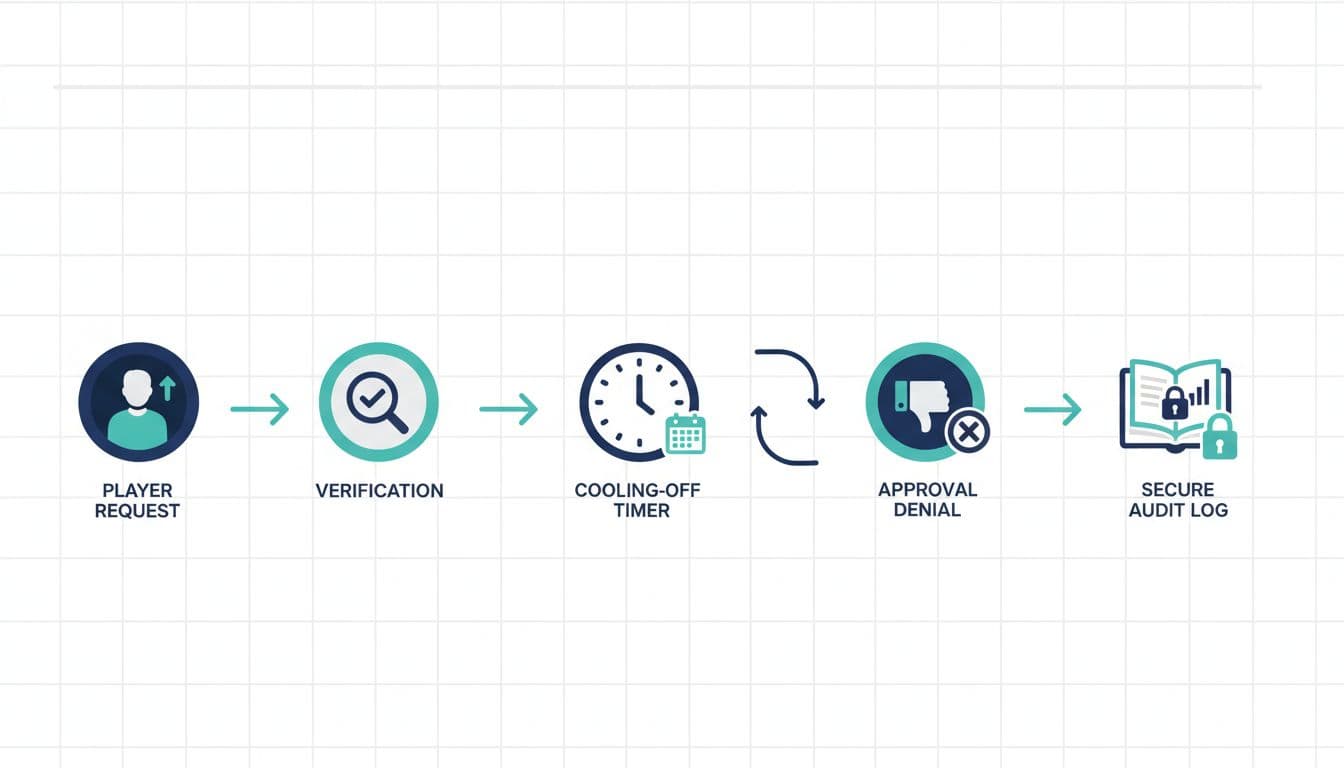
The best workflow is boring on purpose. It’s predictable, role-based, and consistent across channels (web, app, support). Here’s a clean model that works for most operators and is easy to automate in a case-management tool.
The five-step flow (request → verify → cool-off → decide → log)
1) Capture the request (front door matters)
Standardize the inputs: current limit, requested limit, time period (daily/weekly/monthly), and reason. If the request comes via support, support should enter it through the same form customers use, so the dataset stays consistent.
2) Verify identity and account context
This isn’t only KYC. It’s also “are we looking at the right player state?” Pull the essentials into the case: recent deposits, failed deposits, self-exclusion status, active RG flags, and open disputes.
3) Apply a cooling-off timer automatically
When the customer asks to raise limits, your system should set the request to Pending and start the clock. The player should see: what they asked for, when it will take effect, and how to cancel.
4) Decision rules plus a human check (when needed)
Keep it simple: low-risk requests can be auto-approved after the cooling-off period, higher-risk requests route to compliance or RG. For context on how regulators talk about “customer-led tools,” see the UKGC’s guidance on financial limits.
5) Write audit-proof notes and close the loop
The decision should generate: the outcome, the effective time, the reason code, and a short human-readable note.
A quick way to keep ownership clear:
| Workflow step | Owner | Minimum evidence to store |
|---|---|---|
| Request captured | Product/support | Request details, channel, timestamp, player confirmation |
| Verification | System/compliance | Account state snapshot, flags, KYC status reference |
| Cooling-off | System | Timer start/end, cancellation option shown, messages sent |
| Decision | System or reviewer | Rule triggered, reviewer ID (if any), approval/decline code |
| Audit log | System | Immutable event record, who changed what, and when |
Cooling-off rules players understand (and regulators can follow)

A cooling-off period only works if it’s visible, predictable, and enforced by the system (not left to a shift lead’s memory).
What “good” looks like in practice
Make the timer explicit. Put the effective date and time in the confirmation screen and in the follow-up email. Don’t bury it in terms and conditions.
Let the player cancel easily. If a customer can’t reverse the request, you’ll create friction and complaints. Give them a one-tap “Cancel pending increase” option.
Separate “deposit limits” from other tools. In Great Britain, the rules are moving toward consistent naming and definitions, with more standardization from June 2026. A good plain-English explainer helps align expectations, and legal commentary can help teams interpret the impact (see analysis of the UKGC deposit limit changes).
Treat decreases differently. If a player lowers a limit, apply it instantly. Don’t reuse the same pipeline as increases.
A relatable example (for your support team script)
A player asks to raise a weekly deposit limit from $200 to $800 after a bad weekend. Your system accepts the request, starts the cooling-off timer, and sends a message that the new limit will apply after the waiting period unless canceled. Support can say, “It’s set and pending. You can cancel anytime before it takes effect.”
That message is calm, clear, and consistent. It also prevents agents from improvising.
Audit-proof notes and logging that stand up months later

When an auditor asks, “Why did you approve this iGaming limit increase,” they don’t want a story. They want a timeline.
The note style that avoids trouble
Write notes like a referee, not a salesperson. Focus on observable facts and decision logic.
A strong note includes:
- What changed: “Requested increase from X to Y, weekly deposit limit.”
- Why it was approved or declined: tie to policy, risk signals, or affordability checks (where applicable).
- What safeguards were applied: cooling-off timer, messages sent, links to limit tools shown.
- Who did what: system decision vs named reviewer decision.
Also, store event logs as append-only records. If someone edits a note, keep the original and add an amendment with a timestamp and user ID. “Clean” logs are a red flag, real operations leave footprints.
Where automation helps (without turning it into surveillance)
Teams are already using models to spot unusual play patterns, and the same approach can help route risky limit increases for review. If you’re exploring that side, this primer on machine learning applications in sports betting is a useful starting point for understanding how pattern detection works in wagering contexts.
Keep boundaries clear: use automation for routing and consistency, not for making opaque decisions you can’t explain.
Conclusion
In 2026, handling an iGaming limit increase request is less about speed and more about consistency: a clear approval workflow, a real cooling-off period, and notes that read like a timeline, not a chat.
If your team can answer “what happened, when, why, and who approved it” in under two minutes, you’re in a strong position. The next step is simple: document your policy, implement the pending timer, and standardize the case notes so every request leaves an audit-ready trail.

Adeyemi Adetilewa leads the editorial direction at IdeasPlusBusiness.com. He has driven over 10M+ content views through strategic content marketing, with work trusted and published by platforms including HackerNoon, HuffPost, Addicted2Success, and others.