
If access is the key to your company’s “front door,” who’s tracking how many copies of that key exist, and who still has one?
That’s the everyday problem identity lifecycle management solves. It’s the practice of controlling user identities and access rights from day one (or even pre-hire) through job changes, and finally exit, so the right people get the right access for the right time.
For founders and small teams, this often starts as a few manual steps in Google Workspace or Microsoft 365. Then the company grows, tools multiply, contractors rotate in and out, and suddenly nobody can answer a simple question: “Who still has access to what?”
What identity lifecycle management really covers (and why growing teams trip over it)
Identity lifecycle management is often described as the end-to-end process of managing identities and entitlements across their full “joiner, mover, leaver” journey (a clear overview is explained in One Identity’s ILM guide).
In real life, it includes:
- HR events (hire, transfer, termination) that trigger access changes
- Provisioning and deprovisioning across email, SaaS apps, databases, and dev tools
- Access governance controls like least privilege, approvals, and separation of duties
- Proof for audits, incident response, and investor diligence
This matters because access drift is quiet. Nothing “breaks” when someone keeps extra permissions. It just increases the blast radius when a password is reused, a device is lost, or an employee leaves on bad terms.
For a broader view of where identity fits in modern security programs, see Microsoft’s employee lifecycle governance scenario.
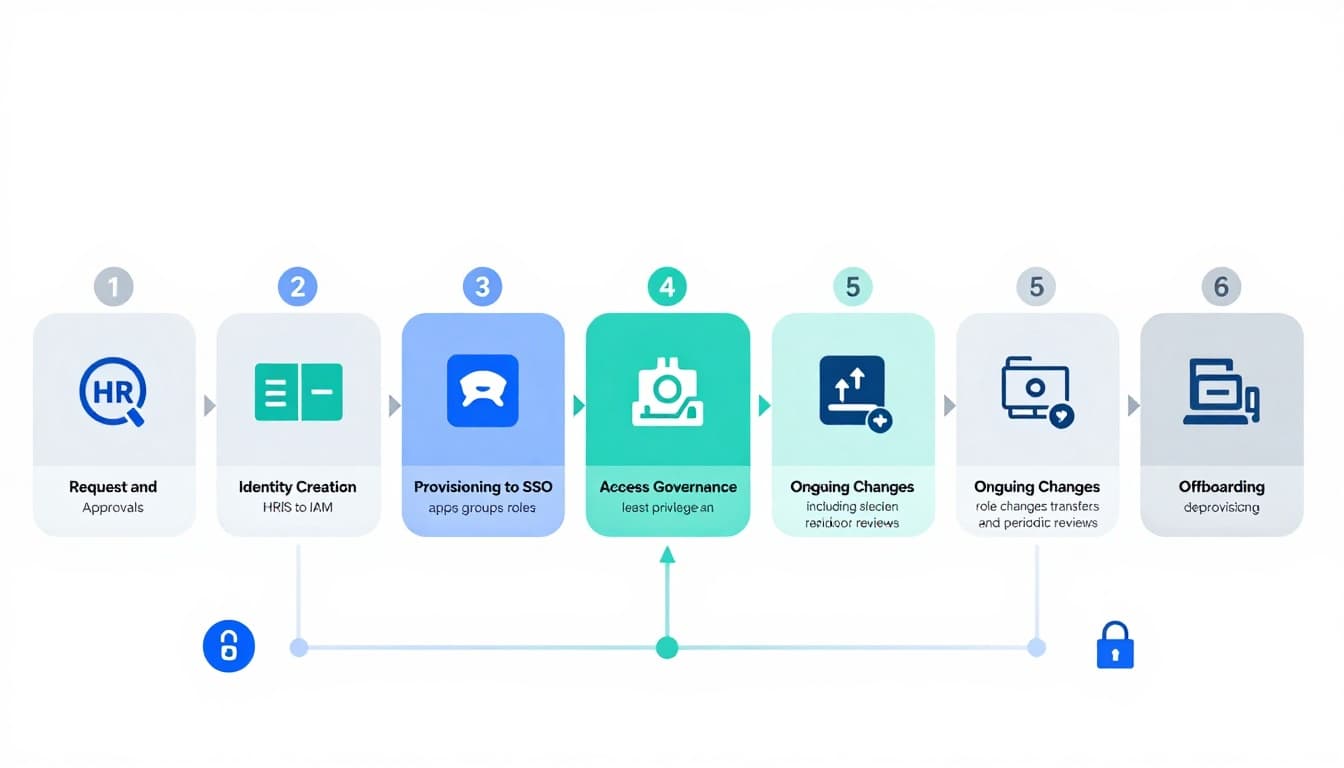
The lifecycle in one view: onboarding, changes, and offboarding
Most companies run identity lifecycle management through a simple model: joiners (onboarding), movers (role changes), and leavers (offboarding). The trick is connecting each phase to a reliable trigger and a consistent approval process.
Here’s a practical snapshot you can map to your tools.
| Lifecycle stage | Trigger source | What must happen | Primary owner |
|---|---|---|---|
| Pre-hire and onboarding | HRIS entry, offer accepted | Create identity, assign baseline access, enforce MFA | IT and HR |
| Provisioning to apps | Role or department | Add to SSO apps, groups, licenses, shared drives | IT and app owners |
| Access governance | Policy requirements | Approvals, least privilege, separation of duties | Security and compliance |
| Role changes (movers) | HRIS update, manager request | Remove old access, add new access, review privileges | IT and manager |
| Periodic access reviews | Schedule (monthly/quarterly) | Certify who has access and why | App owners |
| Offboarding (leavers) | Termination date, urgent exit | Disable accounts, revoke tokens, transfer data ownership | IT and security |
If your cloud footprint is growing fast, it helps to tie ILM to a broader plan for identity-first defense. This aligns well with the direction many teams are taking in key cloud security trends for 2025.
Onboarding access: build the “first day” experience without creating long-term risk
Onboarding is where speed fights safety. A new hire needs tools immediately, but rushed access is how companies end up with interns in production systems.
A clean onboarding flow usually looks like this:
Start with a role template: Define baseline access by role (sales, finance, support, engineering), not by person.
Use one source of truth: HR should trigger identity creation, not a Slack message. When HR is the trigger, you get consistency and an audit trail.
Default to SSO and MFA: New accounts should be forced through SSO and multi-factor authentication from the first login. If your apps don’t support it, that’s a tool risk to track.
Time-box elevated access: Admin rights should expire unless renewed. This reduces “permission creep” while keeping teams productive.
Example: A startup hires a part-time bookkeeper for three months. With a good template, they get accounting software access and shared drive folders, but not the full payroll admin role. If the contract ends early, offboarding is one switch, not a scavenger hunt.
Movers: the most ignored phase (and the source of access creep)
Most security incidents tied to internal access are not caused by brand-new hires. They come from existing users whose roles changed while their old permissions stayed behind.
Movers include promotions, team transfers, temporary project assignments, and contractors who quietly become “permanent.” This is where identity lifecycle management either works, or becomes a spreadsheet nobody trusts.
To reduce access creep:
Treat every role change like a mini-offboarding: Remove access tied to the old role before adding new access. Otherwise, you just stack permissions.
Use approvals that match the risk: A manager can approve access to a shared drive. Finance systems, production databases, and admin consoles should require stronger checks.
Run short, recurring access reviews: Quarterly reviews are common, but high-change teams (support, sales ops, engineering) often benefit from monthly reviews for a few critical apps.
A helpful framing is least privilege plus visibility. If you’re exploring how analytics can support smarter control, this pairs well with AI-powered threat detection in business intelligence, especially for spotting unusual access patterns.
For a security-focused view of lifecycle controls and automation, CyberArk’s definition and overview is a solid reference point.
Offboarding: the “last day” checklist that protects your IP
Offboarding is where risk spikes because timing matters. A planned exit is one thing. A sudden termination, layoff, or contract dispute is another.
A complete offboarding sequence should cover more than disabling a mailbox.
Account shutdown (immediate)
Disable SSO and directory accounts first, so access stops everywhere at once.
Token and session revocation
If you use modern SaaS tools, active sessions and API tokens can keep working even after a password reset. Make sure your process includes revoking tokens and sessions.
App deprovisioning and license recovery
Remove access in critical apps (CRM, finance, cloud consoles, support tools) and reclaim licenses to reduce cost.
Data ownership transfer
Transfer ownership of docs, shared drives, repos, and key inboxes. This prevents “orphaned” assets that nobody controls.
Device and endpoint access
If you use MDM, remove device access and wipe corporate data where appropriate. If you don’t, build a manual device return and verification process.
Example: A marketing manager leaves with access to ad accounts and analytics. If offboarding only disables email, the ad platforms might still be active on their personal device. That’s how budgets get drained and data walks out.
Operationally, this ties closely to strong IT process design. Teams that already invest in better workflows through DigitalOps role in IT security and compliance usually find offboarding gaps faster because responsibilities are clearer.
How to set up identity lifecycle management in a small business (without boiling the ocean)
You don’t need an enterprise program to get real wins. You need repeatable steps.
- Pick your identity “hub”: Usually Microsoft Entra ID or Google Workspace, plus SSO where possible.
- Map your apps: List systems that hold sensitive data (finance, customer data, code, cloud).
- Create 4 to 8 role-based access templates: Keep them simple, then refine.
- Automate joiner and leaver steps first: Those give the biggest risk reduction quickly.
- Add a basic access review cadence: Start with your top 5 apps.
- Track two metrics: time-to-provision (new hire productivity) and time-to-deprovision (risk exposure).
If you want a structured breakdown of phases and what tends to break in each one, ConductorOne’s ILM phases guide is useful for cross-checking your process.
Conclusion: make access predictable, not personal
When access changes depend on memory and favors, mistakes happen. When access changes depend on triggers, templates, and reviews, the process becomes dependable.
The real goal of identity lifecycle management is simple: new people can work fast, role changes don’t create hidden risk, and exits don’t leave doors unlocked. Start with onboarding and offboarding automation, add mover controls next, and you’ll feel the difference the next time your company hires quickly or lets someone go unexpectedly.

Adeyemi Adetilewa leads the editorial direction at IdeasPlusBusiness.com. He has driven over 10M+ content views through strategic content marketing, with work trusted and published by platforms including HackerNoon, HuffPost, Addicted2Success, and others.